

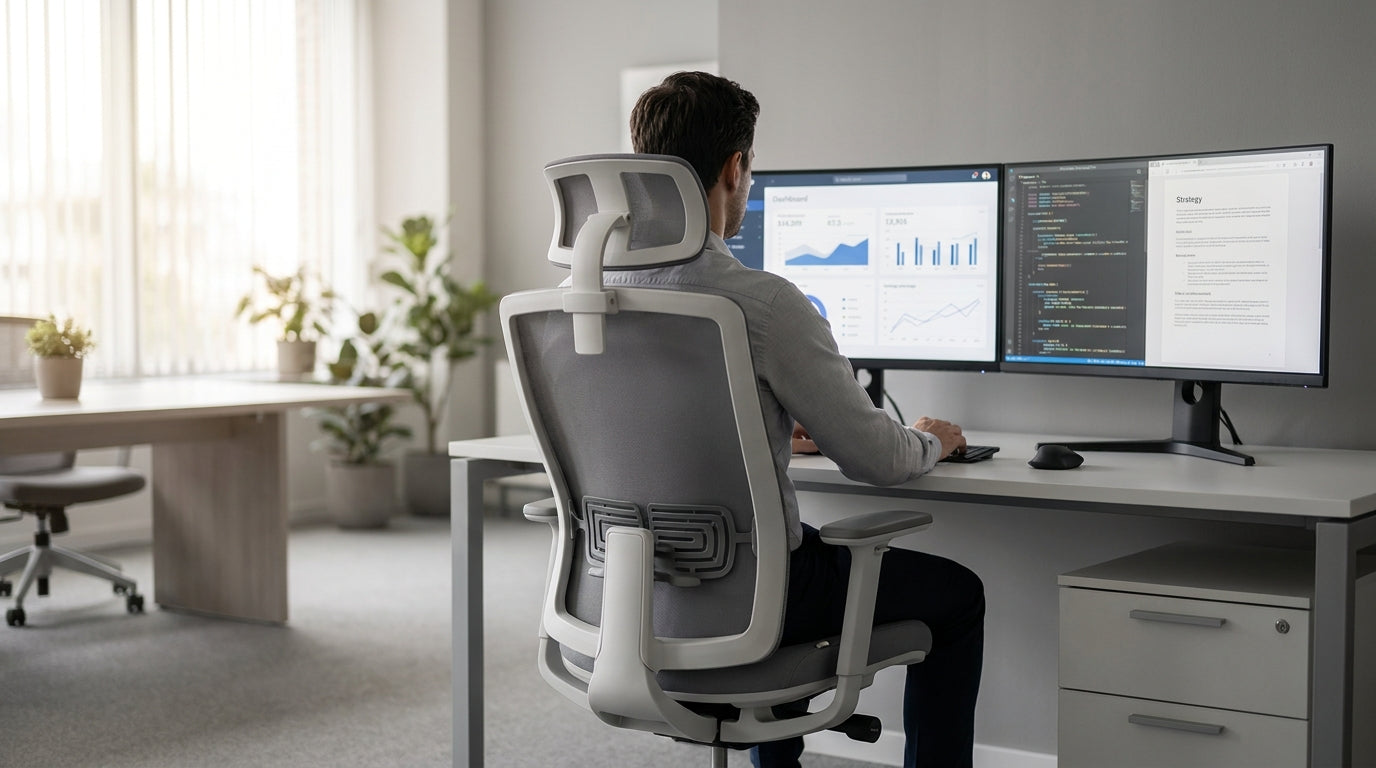
Why posture-focused office chairs matter in Australian workplaces
Spending long hours at a desk can quietly damage your back, neck, and shoulders. Choosing seating with built‑in posture support is one of the easiest ways to protect your spine and boost comfort at work.
In Australia, more of us are working hybrid or fully remote, which often means using dining chairs or old desk chairs never designed for eight‑hour days. Over time, that can lead to slouching, tight hips, and recurring pain that’s hard to shake. Ergonomic seating with posture correction technology tackles these issues by guiding your body into a healthier position instead of leaving you to constantly “sit up straight” by willpower alone.
Modern designs use features like adjustable lumbar support, synchronous tilting, and flexible backrests to keep your spine in a neutral S‑shape. Done well, these details encourage subtle movement instead of locking you rigidly in one pose, which supports circulation and reduces fatigue. Combined with the right workstation layout and accessories such as height‑appropriate desks and quality monitor arms, they form the foundation of a truly ergonomic setup.
Key features that actually improve your posture
Not every “ergonomic” chair genuinely supports posture. Focusing on a few core features will help you tell the difference between smart design and marketing spin.
The most important element is lumbar support – the part of the backrest that curves in toward your lower back. Adjustable lumbar pads or tension systems let you match that curve to your own spine, helping maintain the natural inward arch that prevents slumping. Look for a backrest that supports your full back, not just the mid‑section, so your shoulders and upper spine can relax instead of rounding forward.
Next, consider adjustability. Seat height, depth (how far the seat extends under your thighs), armrest height and width, and backrest tilt should all be customisable. This adjustability is what allows a good task chair to fit different body types. A proper fit means your feet rest flat on the floor, your knees sit just below hip level, and your elbows stay close to your torso while typing.
Tilting and dynamic mechanisms also matter for posture. A synchro‑tilt mechanism lets the backrest recline more than the seat, keeping your hips open while you lean back, which can reduce lower‑back pressure. Posture‑friendly task chairs often include tension controls so you can fine‑tune how easily the chair moves with you. For hotter climates or open‑plan offices, breathable mesh office chairs combine these mechanisms with cooling materials that help prevent sticky discomfort during long shifts.
Comparing chair types for different roles and body types
Different jobs and body shapes call for different kinds of support. Matching chair style to how you actually work can make posture correction far more effective.
For standard desk‑based roles, high‑quality task chairs are usually the best starting point. They are built for all‑day sitting, with full adjustability and supportive backrests that encourage neutral alignment. If you tend to run warm or work in a busy office, ergonomic mesh office chairs offer airflow plus firm, responsive back support that moulds gently to your shape without collapsing.
In design studios and labs where benches sit higher than standard desks, posture can suffer when staff perch on stools with no back support. Purpose‑built drafting chairs and specialised lab chairs & stools add footrings, extra height adjustment, and supportive backrests so you can work at elevated surfaces without hunching. Meanwhile, heavier users or those who want added durability should consider heavy duty chairs, which pair reinforced frames with robust posture features that stay supportive over time.
If you’re setting up a workstation for a single user, it’s worth thinking about the furniture as a complete system rather than just a seat. Pairing a supportive chair with correctly sized single person workstations helps ensure your keyboard, mouse, and screens all sit at the right height and distance. This reduces the temptation to lean forward or twist awkwardly, so the chair’s posture technology can actually do its job.
Materials, comfort, and long-term support
Posture support is only useful if the chair is comfortable enough to use for hours. Materials and padding have a big influence on both comfort and how well the chair holds its shape over time.
Breathable backs, especially in quality mesh office chairs, allow air to circulate and prevent heat build‑up between your shoulder blades. This encourages you to sit back and use the lumbar support instead of perching on the edge to cool down. On the other hand, premium leather chairs can deliver a more executive look while still providing firm, structured support, which some users find better for maintaining an upright posture.
If you need assistive seating at home or for aged‑care environments, power lift chairs combine comfort with powered standing assistance. While they’re not designed as desk chairs, their recline and lift mechanisms can still be configured to support neutral spinal curves, particularly when reading or watching TV. Locally produced options, such as Australian made chairs, often prioritise high‑density foam and durable fabrics suitable for the local climate, which helps maintain consistent support under the hips and lower back.
Long‑term comfort rests on the quality of the seat cushion and how evenly it distributes your weight. A seat that sags or compresses too quickly will tilt your pelvis back, encouraging a slouched position. Firm yet forgiving foam that keeps your hips level and your thighs supported without cutting off circulation gives the chair’s posture technology the stable base it needs to work effectively.
How to set up your chair and workstation for healthy posture
Even the most advanced chair can’t fix posture on its own. A few simple setup steps ensure the whole workstation supports your body naturally.
Start by adjusting the seat height so your feet rest flat on the floor and your knees are slightly below your hips. Then set the backrest so the lumbar support nestles into the curve of your lower back, not pressing too high into your ribs or too low into your hips. Armrests should sit just under your elbows when your shoulders are relaxed, helping keep your forearms parallel to the desk without you having to hunch.
Screen height is another common culprit in poor posture. With your chair correctly adjusted, fit your monitor so the top of the screen sits roughly at eye level, using a quality monitor arm if needed. This prevents you from craning your neck forward or tilting your head down all day. At the same time, make sure your keyboard and mouse are close enough that your elbows stay near your body, which reduces shoulder strain.
Finally, remember that good posture involves movement. Even with a supportive task chair, aim to stand, stretch, or walk briefly every 30–60 minutes. If you work at a dedicated setup with single person workstations, you can build short movement breaks into your routine without disrupting others. These regular resets, combined with a well‑adjusted ergonomic chair, make it much easier to maintain healthy alignment throughout the day.


