

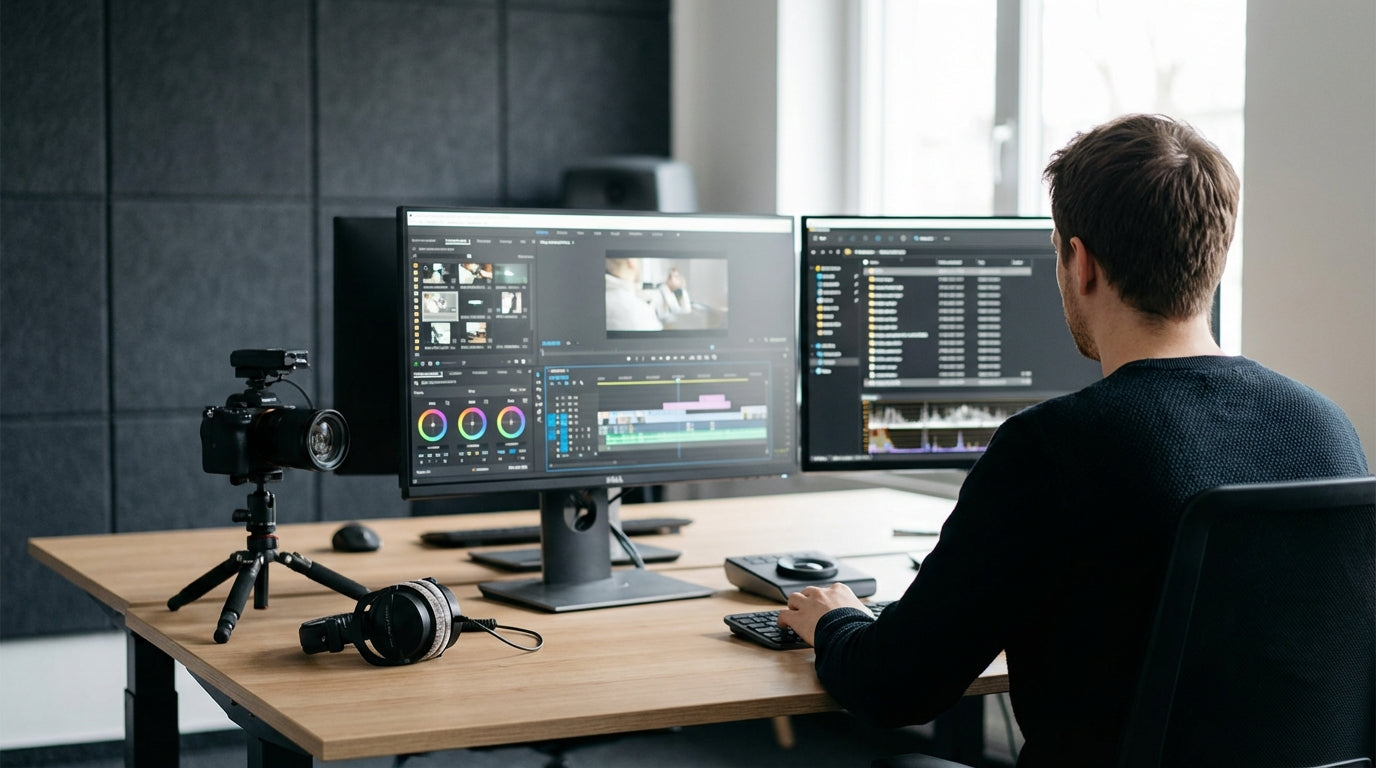
Designing a Studio Layout That Works on Camera
Video production studios need furniture that looks good on camera and works hard behind the scenes. Layout is just as important as the gear you buy.
Start with the main work zone where editing and planning happen. A simple, clean workstation keeps the focus on your content, not the clutter around you. Many creators use streamlined Home Office Desks to anchor their editing suite, then build camera, lighting, and sound around that core. Aim for a layout where you can swivel from computer to camera to storage without tripping over cables or lighting stands.
If you’re working in a small or awkwardly shaped room, space-saving layouts make a real difference on shoot days. Corner Workstations help you tuck your edit bay into a corner and leave the centre of the room free for filming and movement. This also lets you keep your monitors, audio interface, and control surfaces close together, so you spend less time shifting around and more time tweaking your timeline.
Think about sightlines for both you and your audience. Your desk should support a clean background, whether that’s a styled wall, shelves, or a studio backdrop. If you also record voiceovers or live streams near your edit area, consider screening off a small recording zone with Office Pods to reduce noise and visual distractions. Planning this early saves you from constantly rearranging furniture every time you hit record.
Workstations and Desks Built for Editing and Colour Grading
Editing and grading demand comfort, accuracy, and excellent monitor positioning. Your workstation should handle long sessions without causing fatigue.
For most editors, desk depth matters more than they realise. You need enough space for large displays, a control surface or drawing tablet, speakers, and still have room for a keyboard and notes. Compact Home Office Desks work well for laptop-based workflows, but multi-monitor setups are usually better supported by wide or L-shaped Corner Workstations. The extra surface area lets you separate “tech” from “paper” so scripts, shot lists, and hard drives don’t constantly collide.
Standing options are worth a serious look if you’re spending hours a day at the timeline. Height Adjustable Workstations let you switch between sitting and standing, which can reduce back strain and improve focus on long projects. A sit–stand desk also helps when you need to demo something on-screen for clients or collaborators in the studio, as you can quickly raise the desk so everyone has a clear view of the monitors.
Monitor placement is critical when you’re colour grading or working with detailed composites. Purpose-built Monitor Arms allow you to position each display at the correct height and angle, reducing neck strain and giving you a more accurate view of colour and contrast. Being able to swing a screen towards your recording area also helps if you reference scripts, notes, or live chats while shooting. Don’t underestimate cable routing either: pairing your desk with dedicated Cable Management keeps your setup tidy, safer, and easier to troubleshoot when something goes wrong five minutes before a deadline.
Seating That Supports Long Shoots and Edit Sessions
Good seating is non-negotiable in a production studio. You and your team will sit for hours while filming, editing, and reviewing footage.
Look for ergonomic chairs designed for task-heavy work, not casual home seating. Task Chairs with adjustable seat height, lumbar support, and armrests make a noticeable difference to comfort and posture across the workday. When you’re locked into a complex edit or managing multiple timelines, you want to be thinking about your story, not your sore back.
Ventilation is especially important under hot studio lights. Mesh Office Chairs help keep you cool by allowing airflow through the backrest, which is handy in small rooms with limited air-con. The flexible mesh also adapts to different body shapes, making it easier to share chairs between editors, producers, and guests who rotate in and out of the space.
Consider how your chair moves around the set as well. Smooth-rolling casters let you shift from your primary desk to secondary surfaces, such as equipment racks or client viewing stations, without constantly standing up. Combining mobile Task Chairs with stable workstations creates a fluid workflow where you can quickly jump from shooting to checking a clip on the timeline, then back to set to adjust framing or lighting.
Acoustic and Visual Control for Cleaner Recordings
Sound quality can make or break video content, even if your camera work is strong. Thoughtful furniture and acoustic treatments help you capture cleaner audio with less post-production repair.
Many studios struggle with echo and reverb, especially in rooms with hard floors and bare walls. Acoustic treatment doesn’t have to look like a recording studio from the 80s; modern Acoustic Wall Tiles come in subtle colours and patterns that double as background design elements. By placing them behind and opposite your recording position, you reduce reflections and give microphones a much “drier” sound that’s easier to mix.
Don’t forget the ceiling, which often reflects sound back into sensitive mics. Installing Acoustic Ceiling Traps over your primary filming and voiceover spots helps tame flutter echo and boxy room tone. This is especially important if you’re using shotgun or condenser microphones that pick up fine details—and unwanted room noise—very clearly.
Visual control matters as much as audio. Semi-enclosed Office Pods can act as mini voice booths or private call areas for producers while shooting continues elsewhere. They block visual distractions and soften sound, providing a controlled space for voiceovers, remote interviews, or live-stream commentary without needing to build a dedicated sound booth from scratch. Combining pods with well-placed acoustic panels gives you a professional-sounding environment in a typical office footprint.
Cable, Gear, and Set Management for a Professional Finish
A tidy studio is easier to work in and looks more professional on screen. The right furniture and accessories keep gear under control.
Video production naturally generates clutter: cameras, lenses, microphones, lights, batteries, and storage devices all compete for space. Workstations with built-in routing, paired with dedicated Cable Management solutions, help you separate power, data, and audio lines to minimise trip hazards and electrical interference. Using under-desk trays, cable spines, and grommets also keeps your background cleaner for wide shots, which is especially useful if your desk appears in frame during streams or tutorials.
Flexible desk layouts make it easier to move between different set-ups without a complete teardown. With Height Adjustable Workstations, you can quickly adapt surfaces for product shots, overhead unboxings, or multi-camera talks by simply changing the desk height and re-aiming your lights. Pairing these with sturdy Monitor Arms frees up surface area for sliders, small tripods, or capture devices, since your screens are off the desk and securely mounted.
Finally, think beyond the main edit desk and create zones for specific tasks. A compact filming corner supported by an L-shaped setup from the Corner Workstations range, a quiet recording nook using Office Pods, and a dedicated edit bay with ergonomic Task Chairs will streamline your workflow. When every zone has the right furniture, you spend less time rearranging stands and cables, and more time capturing and polishing the content your audience actually sees.


